SIP Endpoint Registration Options for NexusUC Domains
Localcom provides three methods for registering SIP endpoints depending on how NexusUC is deployed and where the devices are located.
1. DNS SRV (Internal Device Registration — On-Prem PBX)
When to Use:
- For locally installed On-Premise PBXs hosted NexusUC instances
- When a partner installs NexusUC on a local PC
- When using Localcom-provided mini-PCs
Configuration: Under Accounts → Devices → Selected Device
- Transport = DNS SRV
- Port = 0

2. Proxy Port (External Device Registration — Remotely Hosted NexusUC)
When to Use:
- For remotely hosted NexusUC instances (e.g., installation on a Virtual Private Server)
- Commonly used for VPS deployments
Configuration:
- Proxy Port: Can be obtained from the NexusUC service page in the portal (added by default to the device page)
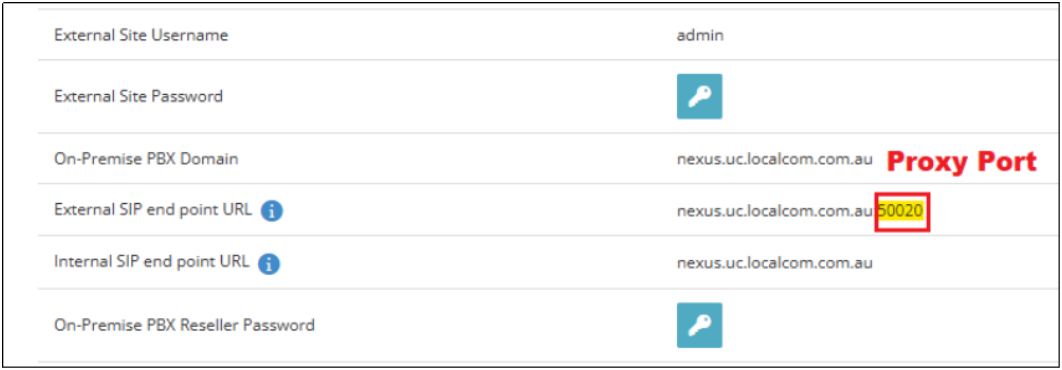
- If the proxy port is not auto-filled, manually enter it under Accounts → Devices → Selected Device:
- Transport = TCP/UDP (Standard)
- Port = Proxy Port

The system is programmed to auto-setup the proxy port by default.
Example of proxy registration on MicroSIP:
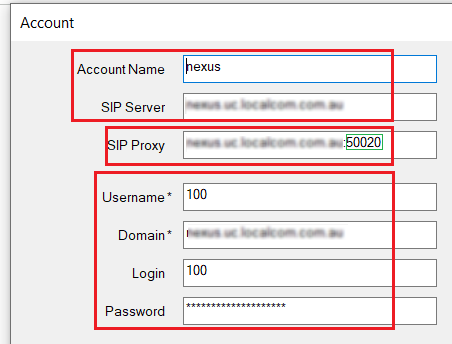
3. Custom FQDN Registration (Custom Domain Name)
When to Use:
- For partners who do not want to use the default domain (uc.localcom.com.au)
- Allows using a custom domain instead (e.g., mypbx.example.com.au)
- The NexusUC instance must be hosted remotely
Configuration:
- Transport: TCP/UDP (standard)
- Port: 5060
- Domain: Partner's custom domain (configured on NexusUC)
Note
Custom FQDN registration does not rely on a proxy.
